Friday, 28 November 2014

Microsoft Desktop Infrastructure Optimisation - more real than anyone expected

You have to be careful for what you ask for, as you just might get it.

I know that it may sound a little cheesy, but this statement really captures what I am thinking right now. Six years ago I attended a presentation by a senior Microsoft employee who was touting the benefits of the then new minted Desktop Optimisation model or more commonly known as the Microsoft Infrastructure Optimisation (IO) model. During the presentation (which was very well done) the Microsoft employee (who would now be called an evangelist) touted what was a strategic vision for Microsoft. 

We have been to “strategic” sessions before. We have seen vision statements before. However, I have to give credit to Microsoft, as they have follaowed through with their ideas and approach of taking their customers from a basic (read slow and expensive) infrastructure to a more dynamic (fast changing, agile, and much more effective) one.

Let's go back to 2009. The following diagram illustrates where most of us were  in 2009 - hopefully in the Standardised section (if you were lucky, your company was striving in the Rationalised section).  


I am using a slightly different version of the original Microsoft IO model (the original is on an old laptop in the garage) sourced from Getronics (which you can find here) but the key messages are the same. 

At the time that Microsoft Vista was released, Microsoft had just experienced a severe “morality moment” with the release of Windows XP Service Pack 2. Service 2 for Windows XP was effectively a security update that recognised that most computers were connected to the internet, and now were vulnerable to a huge variety of new threats including, trojans, worms, malware and even adware. Something had to be done to resolve the millions of vulnerable systems that Microsoft was ultimately responsible for. Windows XP Service Pack 2 (remember this in 2006/7) started the long (painful) journey to building a secure desktop.

The key message at the time, was that most organisations were in either the Basic or Standardised sections of this model. Microsoft, through its efforts in building its newer (modern) versions of Internet Explorer (IE) and the desktop and server platforms associated ecosystem software (think SCCM) has moved most organisations (us) from Basic to somewhere between Rationalised and the event goal of Dynamic platforms.

As I mentioned in my last posting  on the Windows update process  it now looks like Microsoft has started to deliver on the “Dynamic” promise. By providing rapid, updates to their workstation OS platforms, they are now setting the scene for incremental and numerous updates that add bug fixes, resolve security vulnerability issues and even add new features to their platforms through monthly and possibly weekly updates.


And the now the next challenge is, can we keep up?

Wednesday, 26 November 2014

Windows 10 Update - Taking it fast or slow

This post is a little late, as I wanted to comment on Microsoft's new update process when it was first released late last October. Like many others, I was pretty busy with the massive update from Microsoft for this November Patch Tuesday. 

You you can read more about about this series of Microsoft security patches and updates at my Computerworld blog found here

Windows 10 has not been officially released yet, but already we have seen a number of updates and in fact it looks like there is at least two update channels or tracks offered by Microsoft now.

As you can see from the following screen shot, you can choose either a "Slow" or "Fast" track for your Windows 10 updates.


Gabe Aul on his Windows blog says this about the new two-track update process;

"To put this into perspective, it’s helpful to understand what we call “ring progression”. Every day our build process compiles the latest changes our engineers have made and produces a build that is automatically sent out to our “Canary ring” – people in OSG who want to be the first to get started using and testing the newest code. Once we have validated with that group that the build is stable enough to use by more people, it is sent out to the next ring – all of OSG – where we validate it with that audience. From there we send it to tens of thousands of people here at Microsoft, and after it proves stable enough there, we make it available to you."

In addition to the two publicly available update tracks provided by Microsoft as part of the Windows Insider (Technical Preview) program there is a few more layers or rings (one is called the Canary Ring) that covers the initial builds from developers and internal testers.

Microsoft has provided a nice illustration of this process in the following diagram.

In addition, it looks like there is an Enterprise track as well, which you can find here.

It looks like Ars Technica is following this story as well, which can read more about here.


Monday, 24 November 2014

Windows 10 finally comes clean with its versioning

One of the quirks of the Windows operating system family lies with its naming conventions - both internally and externally. Yes, we had Windows 2000, then XP, then Vista, then Windows 7 and recently version 8 and subsequently 8.1. I am sure that most of those who read this blog knows that the actual (reported) version for each operating system has almost nothing to do with its name. 

For example, here are the OS versions that Windows reports back for each released version for the past 14 years;

Operating system     Version number
Windows 8.1                      6.3*
Windows Server 2012 R2      6.3*
Windows 8                        6.2
Windows Server 2012          6.2
Windows 7                        6.1
Windows Server 2008 R2      6.1
Windows Server 2008           6
Windows Vista                     6
Windows Server 2003 R2     5.2
Windows Server 2003          5.2
Windows XP 64-Bit Edition    5.2
Windows XP                      5.1
Windows 2000                   5

Noting that Windows NT (or NT 4) had a 4.x version number. And so, it looks like we have been doing version 6.x since the release of Windows Vista. There has been a number of reasons for this, most of which relate to application compatibility. One of the primary reasons for an application to fail, was that a poorly coded version check (generally to see if the OS was later than 2K) misread the version number and prevented an otherwise OK application from starting correctly.

In fact, we get into some truly weird scenarios with Windows 8.1 where the Windows API GetVersionEx has been modified to report the wrong version to developers. You can read more about this versioning behavior on MSDN here, but I have included an interesting quote here;

"In previous versions of Windows, calling the GetVersion(Ex) APIs would return the actual version of the operating system (OS), unless the process had been mitigated by an app compat shim to give it a different version. This was done on a provisional basis and was relatively incomplete in terms of the number of processes that Microsoft could reasonably shim in a release. Many applications fell through the cracks because they didn’t get shimmed due to poorly designed version checks."

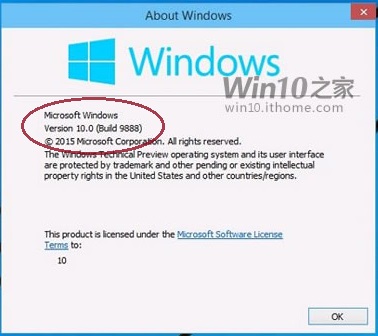
Now it seems, and this is a rumor, but Microsoft may be aligning its reported OS versioning information with the operating system name in Windows 10. Here is a quick snap-shot of the latest build from Microsoft


Has Microsoft finally come clean about its reported version? When I get the latest version, I will run some code level tests - and, we will see.

Watch this space.


Friday, 21 November 2014

Patching Bad: The new reality of systems updates.


I have been chatting with my colleagues about the stability of Microsoft patching over the past few weeks.  Remember the days when Microsoft would ship patches that would break your desktop or server environment? Or, update a critical component to your line of business applications (LOB) such as Microsoft XML (MSMXL) that "dropped" your trading floor?

Well, over the past few years Microsoft has really upped its game and we have seen very few problems. In fact, it looks like most system administrators have been just shipping out the latest Microsoft patches, with very little testing. Maybe a quick loop through the IT department prior to a full-scale deployment. And the number of issues raised,  has (in general) been pretty minimal. When you did a cost analysis of testing each patch or update against an application or workstation build portfolio, it really looked like a detailed testing plan lost out to a "reactive find and fix" strategy after each update.

That thinking may be changing.

Over the past few months, we have seen a number of patches that have caused Blue Screens of Death (BSoD's) and recently a
Microsoft security update (KB2984972) that attempted to resolve a Remote Desktop Protocol (RDP) security vulnerability also broke their Microsoft App-V virtualisation technology. In addition to these issues, Microsoft has also had to re-release (redo) four updates for this past October Patch Tuesday release. 

Some are even calling Microsoft's Patch Tuesday, "Black Tuesday" due to all of the compatibility and retracted patches.

This RDP update left some Microsoft App-V users with a "Loading MyApp 100%" message that stopped any App-V converted application from starting or running correctly. This particular issue has now been resolved by Microsoft with a series of registry fixes. You can find the update here

This bug has been fixed, but Microsoft's patching reputation is now at risk....


References:

Microsoft Sources Registry Edits to Fix KB2984972 Breaking App-V Packages

Four more botched Microsoft patches: KB 3000061, KB 2984972, KB 2949927, KB 2995388

Wednesday, 19 November 2014

Microsoft Delivers Out of Bound Security Update to Kerberos Authentication


Earlier this month, I posted an update on the November Patch Tuesday security releases from Microsoft, which you can read about here. In that posting, I detailed that although it was a massive update of sixteen patches, two updates were not ready for release.  The first of those two patches, MS14-068 has now been released by Microsoft and is the fifth patch rated as critical for November by Microsoft.

The Microsoft security update MS14-068 attempts to resolve a privately reported vulnerability in the Kerberos Key Distribution Centre (KDC) authentication system. Once a system has been compromised through this vulnerability, an attacker could impersonate any account (including domain administrator) with the potential to create, edit, or delete any system account. In addition to the severity of this potential security issue, Microsoft has reported limited targeted attacks of this particular vulnerability.

This patch updates a significant number of operating system files (DLL’s) and also updates the SChannel library which was included in the update MS14-066 

This is definitely a "patch now” Microsoft update

Chris Goettl has a great blog on these issues which you can find here

Additional references for this Microsoft update can be found at the Knowledge base article KB2992611